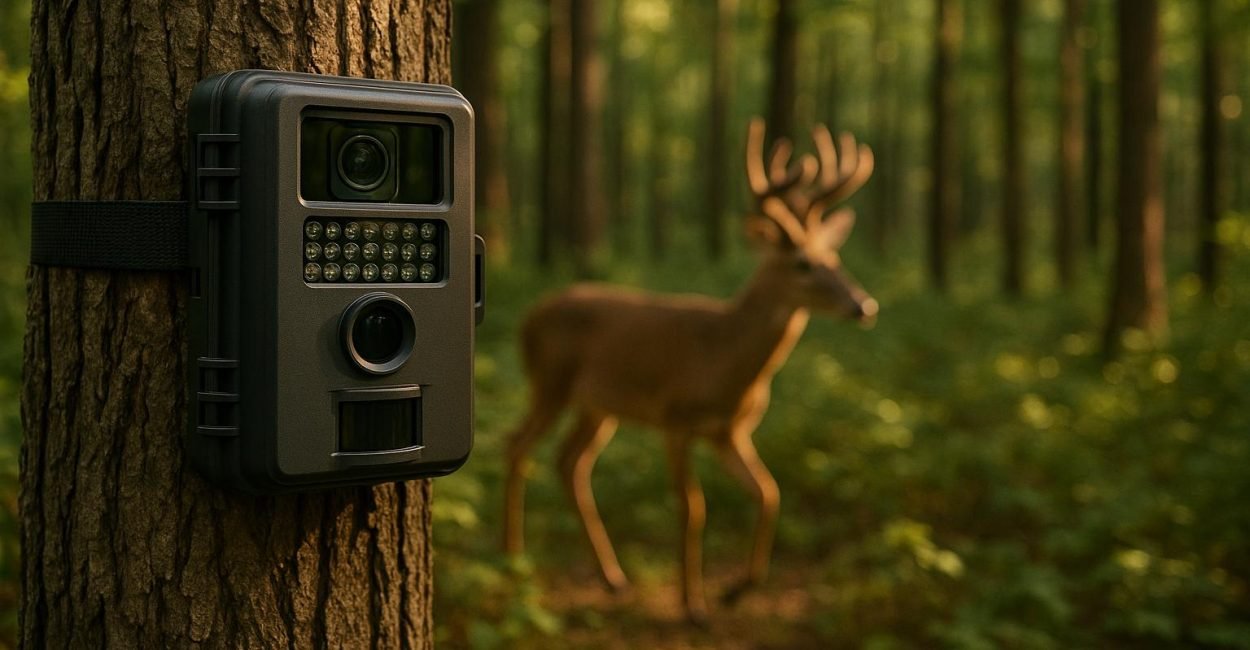
Trail cameras use motion detection to automatically take photos or videos when movement is detected. At the core of this technology are Passive Infrared (PIR) sensors, which detect changes in heat within their range. This eliminates the need for constant recording, saving battery life and storage space. Here’s what you need to know:
- PIR Sensors: Detect heat changes caused by moving objects like animals or people.
- Key Features: Detection angle, detection range, trigger speed, and recovery time determine how effectively the camera captures movement.
- Fresnel Lenses: Focus infrared radiation onto the PIR sensor for better accuracy.
- Sensitivity Settings: Adjustable to avoid false triggers from wind, vegetation, or small animals.
- Applications: Wildlife research, hunting, and property monitoring.
Proper placement and settings, like positioning the camera at chest height and pointing it north or south, significantly improve performance. Whether you’re observing wildlife or enhancing security, understanding these basics ensures reliable results.
How Passive Infrared (PIR) Sensors Work
Detecting Infrared Radiation
PIR sensors work by detecting changes in infrared radiation emitted by objects warmer than absolute zero. When a person or animal moves within the sensor’s range, this movement alters the infrared radiation levels, which the sensor converts into an electrical signal. This signal prompts the camera to capture an image or start recording. Since PIR sensors detect heat rather than visual details, they can’t differentiate between, say, a person and a deer based solely on size – they simply respond to shifts in heat patterns. Indoor models generally have a detection range between 10 inches and 65 feet, while outdoor sensors can detect movement as far as 500 feet, making them well-suited for monitoring large outdoor spaces.
The Role of Fresnel Lenses
Once infrared radiation is detected, focusing it becomes essential for accurate performance. This is where Fresnel lenses come in. These lightweight, thin lenses concentrate infrared radiation onto the sensor. Their design features micro-structured triangular segments arranged in concentric circles, mimicking the function of traditional lenses but in a more compact form. By dividing the field of view into multiple zones, Fresnel lenses allow the sensor to monitor broader and more complex areas effectively.
Recent advancements in Fresnel lens technology – such as improved groove pitch and rotational prism arrays – have increased focusing efficiency by 25% and light uniformity by 30%. Modern Fresnel lenses enable PIR sensors to detect motion at distances up to 100 feet. In this setup, the Fresnel lens determines the detection angle, while the PIR sensor sets the range. Together, they define how well the camera captures activity in its surroundings. This pairing ensures reliable motion detection over a wide area.
Limitations of PIR Sensors
Despite their strengths, PIR sensors come with some limitations. They rely on both motion and a temperature difference to trigger an alert, meaning objects that don’t emit heat or stationary warm objects may not be detected. Weather conditions like rain, snow, or fog can reduce their accuracy, and sudden changes in ambient temperature can make it harder for the sensor to distinguish between actual movement and normal fluctuations.
Additionally, these sensors are highly sensitive to minor heat changes, which can lead to false alarms. For example, moving curtains, hot air drafts, small animals, or even wind blowing through vegetation can activate the sensor unnecessarily, especially in exposed areas. Since PIR sensors rely on line-of-sight detection, obstacles like walls or dense vegetation can create blind spots.
To minimize these issues, sensitivity settings can be adjusted to prevent false triggers in areas with frequent movement, such as windy or vegetated zones. A 30-second trigger interval is often effective for most environments. It’s also wise to avoid placing sensors in direct sunlight or near obstructions like tall grass or tree branches. These adjustments can help improve the sensor’s overall reliability.
How to set motion sensor sensitivity on Wildlife Camera
Key Motion Detection Features in Trail Cameras
Trail cameras rely on several technical features to perform effectively. Three main factors determine how well your camera captures wildlife activity: detection coverage, response timing, and sensitivity adjustments.
Detection Angle and Range
The detection angle and range define the area your trail camera monitors. A Fresnel lens determines the detection angle, while the PIR sensor’s sensitivity and circuitry set the detection distance. Together, these create the camera’s "coverage zone", where movement triggers image capture.
Most trail cameras offer a field of view around 40 degrees, but some models go wider. Advanced PIR sensors can detect motion up to 100 feet, while entry-level models might only reach 40 feet. Narrow angles allow for longer detection distances, but broader angles cover more area – though they may lead to more false triggers.
Detection range can also fluctuate with air temperature. In colder weather, sensors may lose sensitivity, while in hot conditions, they might pick up heat signatures from farther away. This means your camera’s performance may vary with the seasons.
Positioning is critical. Mount the camera at chest height and angle it at 45 degrees. Avoid facing it east or west to reduce interference from sunlight. In open areas, point it south to minimize lens flare during sunrise and sunset . These setup choices directly impact the speed and accuracy of motion detection, which ties into trigger performance.
Trigger Speed and Recovery Time
Trigger speed refers to how quickly the camera captures an image after detecting motion, while recovery time is the interval needed to reset before capturing the next shot. For general wildlife monitoring, aim for a trigger speed of 0.5 seconds or faster. If you’re tracking fast-moving animals, look for trigger speeds of 0.25 seconds or less.
Recovery time is just as important. Even with a fast trigger speed, a slow recovery time can cause you to miss key moments. Recovery times vary widely, from under a second to over a minute. Models that can capture multiple images in quick succession are ideal for situations where animals move through the frame quickly or linger in the detection zone.
Sensitivity Settings
Sensitivity adjustments fine-tune how your trail camera operates. These settings help balance capturing wildlife activity while avoiding false triggers.
- High sensitivity: Best for detecting smaller or more distant movements, especially in open fields.
- Medium sensitivity: Works well in areas with moderate vegetation and regular wildlife traffic.
- Low sensitivity: Ideal for windy or busy locations where moving branches or grass might otherwise trigger the camera.
Environmental factors can cause false triggers. To minimize this, clear the area in front of the camera of obstructions like branches or tall grass. Weather also plays a role – point the camera north (or south in the southern hemisphere) to avoid false triggers from the rising or setting sun .
Finally, match the sensitivity setting to your camera’s flash range to conserve battery life. Regularly test and adjust the settings as conditions change. For instance, settings that work during calm weather may need tweaking during windy periods or as vegetation grows thicker around the camera.
sbb-itb-31b92c7
Best Practices for Better Trail Camera Performance
Setting up your trail camera the right way can make a big difference in capturing clear, useful images while also saving battery life and storage space.
Camera Placement Tips
Where and how you place your trail camera plays a huge role in its performance. For the best results, position your camera at about waist height – roughly 3 feet off the ground – to capture full-body shots of wildlife. Set it up 15–20 feet away from the trail and angle it at 45° to catch animals as they move through the frame. This angle not only helps with identification but also keeps animals in the detection zone longer.
To avoid problems with sunlight, point your camera north or south. This prevents overexposed photos and false triggers caused by direct sunlight. Facing it east or west can create glare during sunrise or sunset, which might obscure important details.
Clear the area in front of the camera to reduce false triggers. Remove loose debris like leaves, tall grass, and branches that could sway in the wind and activate the camera unnecessarily. When trimming vegetation, be careful not to disturb the surrounding environment – only cut what’s absolutely necessary to keep the detection path clear.
If you’re targeting a specific species or want to keep the camera less noticeable, try placing it higher – around 6–7 feet – and tilt it downward. This setup offers broader coverage and makes the camera harder for people to spot. Make sure to secure all components, like straps, to prevent them from flapping in the wind and scaring off wildlife.
Adjusting Settings for Seasonal Changes
After setting up your camera, fine-tuning its settings for different seasons can improve its performance. For instance, colder temperatures create a higher contrast between an animal’s body heat and the environment, so you can use lower sensitivity settings effectively. In warmer weather, when the temperature difference is smaller, increasing sensitivity helps maintain consistent detection.
Summer comes with its own challenges. To conserve battery life, increase the delay between photos. Lowering sensitivity can also reduce false triggers caused by insects or swaying plants, which are more active in warm weather. You might also want to schedule your camera to take photos during early morning or late evening, when wildlife is most active and lighting conditions are better.
During winter, test your camera indoors before taking it out to ensure it works well in cold conditions. Extremely low temperatures can slow down mechanical parts, so you may need to adjust the trigger speed for quicker responses. Match your settings to the activity level in your area – shorter PIR (passive infrared) intervals work well in high-traffic spots, while longer intervals are better for areas with less activity.
Reducing False Triggers
False triggers can drain your battery and fill up storage with useless images, so minimizing them is key. Factors like wind, shifting shadows, and fluctuating temperatures can all cause unwanted activations. Placing your camera in consistent lighting conditions helps avoid exposure issues and reduces light-based false triggers.
Keeping the detection path clear is essential. In areas with lots of wind or active vegetation, lowering the sensitivity settings can help prevent constant triggering. Mounting the camera parallel to the ground also improves detection range and reduces false triggers caused by ground-level movements. Avoid overly angled setups, as they can create blind spots or pick up too much small-animal activity.
Before deploying your camera, check the weather forecast to avoid issues like water damage or glare from rain. Make sure lens covers or housings are secure to protect the camera from the elements.
Applications of Motion Detection in Trail Cameras
Motion detection in trail cameras goes far beyond capturing wildlife photography. It plays a key role in research, hunting, and even property security.
Wildlife Observation and Research
Trail cameras are a game-changer for studying animals in their natural habitats without causing disruption. For instance, the Florida Panther Recovery Project used these cameras in the Big Cypress National Preserve to monitor the endangered Florida panther. This helped researchers gather crucial information about the panther population, their reproduction rates, and movement patterns – all without disturbing their environment. Similarly, scientists at the University of California, Santa Cruz employed trail cameras to observe interactions between coyotes and their prey, offering valuable insights into how ecosystems function. With high-resolution images and quick trigger speeds, these cameras ensure researchers capture detailed and reliable data.
The same motion detection technology that aids research also significantly improves hunting techniques.
Hunting and Game Tracking
For hunters, motion detection in trail cameras has revolutionized the way game is tracked. These cameras reveal critical details about animal behavior, such as feeding habits, travel routes, and even interactions with other species. By reducing the need for constant physical scouting, hunters can identify the best times and locations to pursue their targets more efficiently. Modern trail cameras are capable of detecting movement at ranges that align with industry standards, making them reliable tools for game tracking.
To maximize effectiveness, place cameras near food or water sources, along well-used trails, or in bedding areas. Fine-tune settings like detection range, sensitivity, and trigger speed to match your specific environment and target species. Keeping detailed records of activity – such as dates, times, and weather conditions – can help refine your approach over time.
But the usefulness of motion detection doesn’t stop at wildlife – it’s equally valuable for keeping homes and properties secure.
Home and Property Monitoring
Trail cameras are increasingly being used for home and property security. Their battery-powered design means they can be installed in remote areas without needing an electrical outlet. Equipped with PIR sensors, these cameras activate recording when they detect motion or temperature changes. Many models also feature night vision, allowing for 24/7 surveillance, even in low-light conditions.
Unlike traditional security cameras that record continuously, trail cameras only capture footage when motion is detected. This makes them ideal for spotting trespassers or preventing theft. Some models even offer remote access through cellular or Wi‑Fi connections, letting you download footage from anywhere. With a viewing range of up to 100 feet (depending on environmental factors), they’re a versatile option for monitoring properties.
For the best results, ensure your camera has time-stamping capabilities for precise activity tracking. Test the setup after installation, and decide on either a visible placement to deter intruders or a hidden one for discreet monitoring. These features make trail cameras a practical and flexible choice for securing your property.
Conclusion
Getting the most out of trail cameras begins with understanding how motion detection works. At the heart of these devices are PIR (Passive Infrared) sensors, which detect changes in infrared radiation caused by warm objects moving through their field of view. These sensors perform best in environments with noticeable temperature contrasts, making them ideal for wildlife observation.
To capture clear and timely images, knowing the key performance parameters is essential. A trigger speed of around 0.3 seconds is generally ideal, as slower speeds – anything over 0.5 seconds – can lead to missed shots or blurry images, especially with fast-moving animals. Balancing detection angle, detection distance, trigger speed, and recovery time is critical for fine-tuning your camera setup. These factors directly influence how well your camera performs, as discussed in earlier sections.
Placement and settings are just as important. Positioning your camera thoughtfully and adjusting sensitivity can help you strike the right balance – detecting smaller animals without being overwhelmed by false triggers from wind or moving vegetation.
Regular maintenance is another key to long-term success. Use high-quality lithium AA batteries for consistent power, keep the firmware up to date, and choose high-capacity memory cards with fast write speeds. Whether you’re researching wildlife, monitoring game, or securing property, these same principles apply. PIR sensors remain an efficient and cost-effective solution compared to other technologies. By following these best practices, you’ll reduce false triggers and capture more reliable data.
As motion detection technology continues to advance, sticking to these basics ensures your trail camera performs at its best.
FAQs
How can I reduce false triggers on my trail camera in windy or heavily vegetated areas?
To cut down on false triggers caused by wind or moving plants, here are a few practical steps you can take:
- Lower the sensitivity settings on your trail camera. This can help reduce unnecessary activations from small movements like swaying leaves or grass.
- Pick a better spot for your camera. Aim for locations with less vegetation or away from areas where constant movement, like tall grass or branches, is likely.
- Clear the view by trimming branches or removing brush that could move with the wind and set off the motion sensor.
With these adjustments, your trail camera will focus on capturing the activity you actually want to see.
What’s the best way to position a trail camera for optimal motion detection?
To get the best results from your trail camera’s motion detection, set it up 10 to 20 feet away from areas where animals are likely to pass. Mount the camera at a height of 3 to 4 feet off the ground and position it at roughly a 45-degree angle to the expected path. This setup improves the camera’s ability to detect heat signatures and reduces the chances of missing key moments.
For sharper images and fewer false alarms, avoid aiming the camera directly at sunrise or sunset to prevent glare. Also, ensure the camera is level with the ground and focused on active spots like trails, feeding areas, or water sources. A well-placed camera is key to capturing clear and exciting wildlife footage.
How do temperature and weather conditions impact motion detection in trail cameras?
Temperature and weather play a big role in how well trail cameras detect motion. These cameras typically use Passive Infrared (PIR) sensors, which work by spotting heat differences between an object – like an animal – and its surroundings. But when the air temperature is close to an animal’s body temperature, the sensor can have a hard time distinguishing between the two, leading to less accurate detection.
Weather conditions like rain, snow, or strong winds can also throw off the sensors. Heavy rain or snow might block an animal’s heat signature, while shifts in temperature on cloudy or windy days can confuse the sensor by altering the infrared radiation it detects.
Extreme temperatures, whether very hot or cold, can further impact the PIR sensor’s ability to pick up contrasts between animals and their environment. Knowing how these factors affect performance can help you adjust your camera’s settings or placement to get the best results in any weather.